
Menos captura repetitiva
Auxiliar is designed to significantly reduce accounting hours in repetitive, well-documented workflows.
 Embedding Labs
Auxiliar by Embedding Labs
Auxiliar turns CFDI, XML, bank statements, and supporting documents into client-specific accounting intelligence, so teams can work policy by policy with review, traceability, and control.
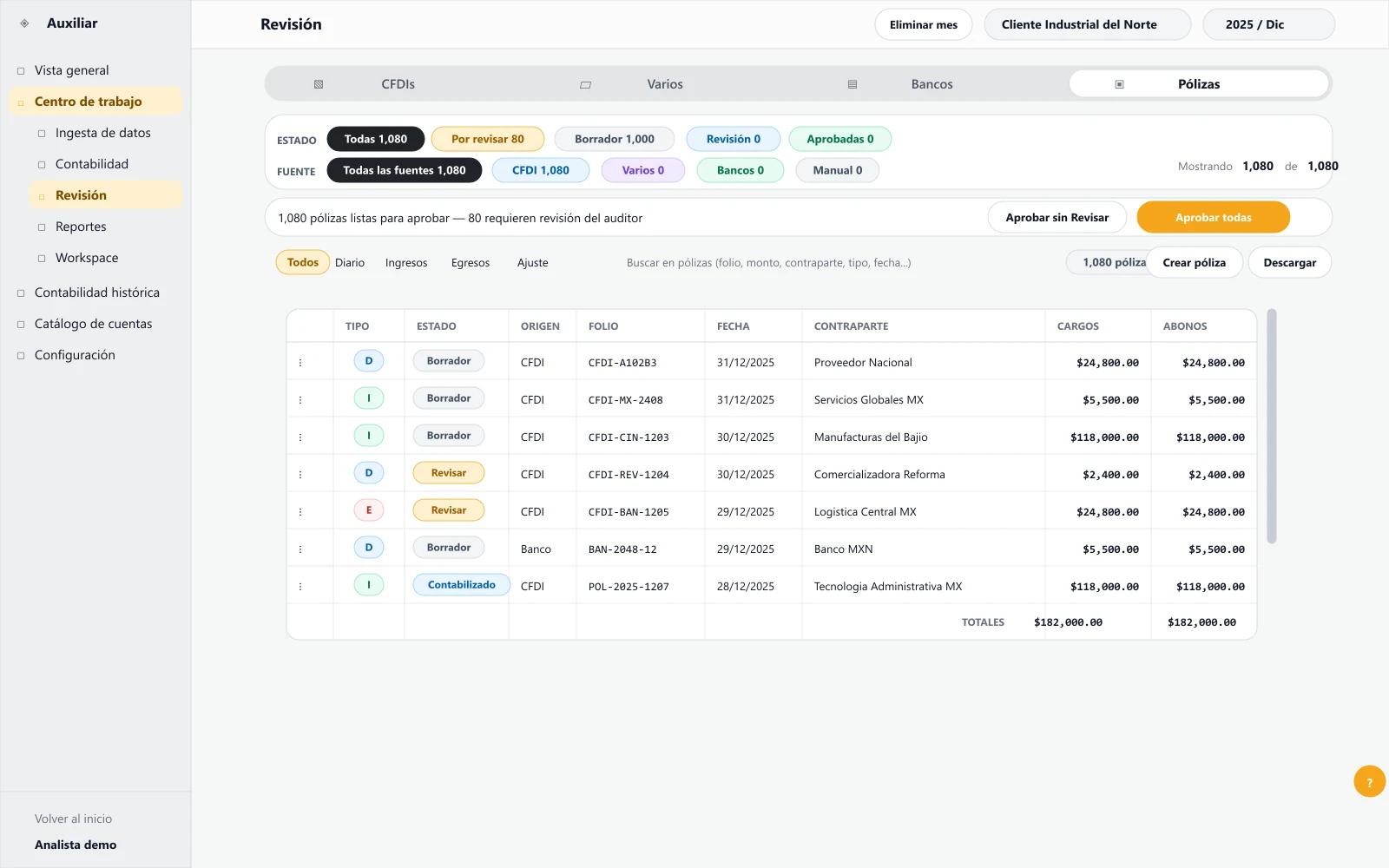
Auxiliar Console
Cierre mensual - Cliente de alto volumen
CFDI validado
Evidencia lista
Póliza propuesta
Pendiente de revisión
Conciliación bancaria
Excepción detectada
Exportación
Controlada por aprobación
Evidencia conectada
CFDI
Vinculado a la propuesta contable
Documento soporte
Vinculado a la propuesta contable
Movimiento bancario
Vinculado a la propuesta contable
Criterio histórico
Vinculado a la propuesta contable
Professional reality
For accounting firms, the question is no longer whether repetitive work will change, but how to increase capacity without losing control, traceability, or month-end close quality.
Auxiliar is designed to significantly reduce accounting hours in repetitive, well-documented workflows.
Accounting teams can spend more time on review, exceptions, tax planning, advisory work, and client control.
The accountant keeps review and approval for criteria that affect the monthly close.
Why Mexico
Mexico has an unusual advantage: a central part of economic activity is already documented as CFDI in XML, with folio, issuer, recipient, concepts, taxes, seal, stamp, and SAT relationship.
Auxiliar works from transaction-level evidence, not only from loose screenshots or isolated PDFs.
The CFDI structure helps connect operations with policies, bank reconciliation, supporting documents, and review.
The close still requires professional judgment; CFDI is an evidence foundation, not an automatic compliance guarantee.
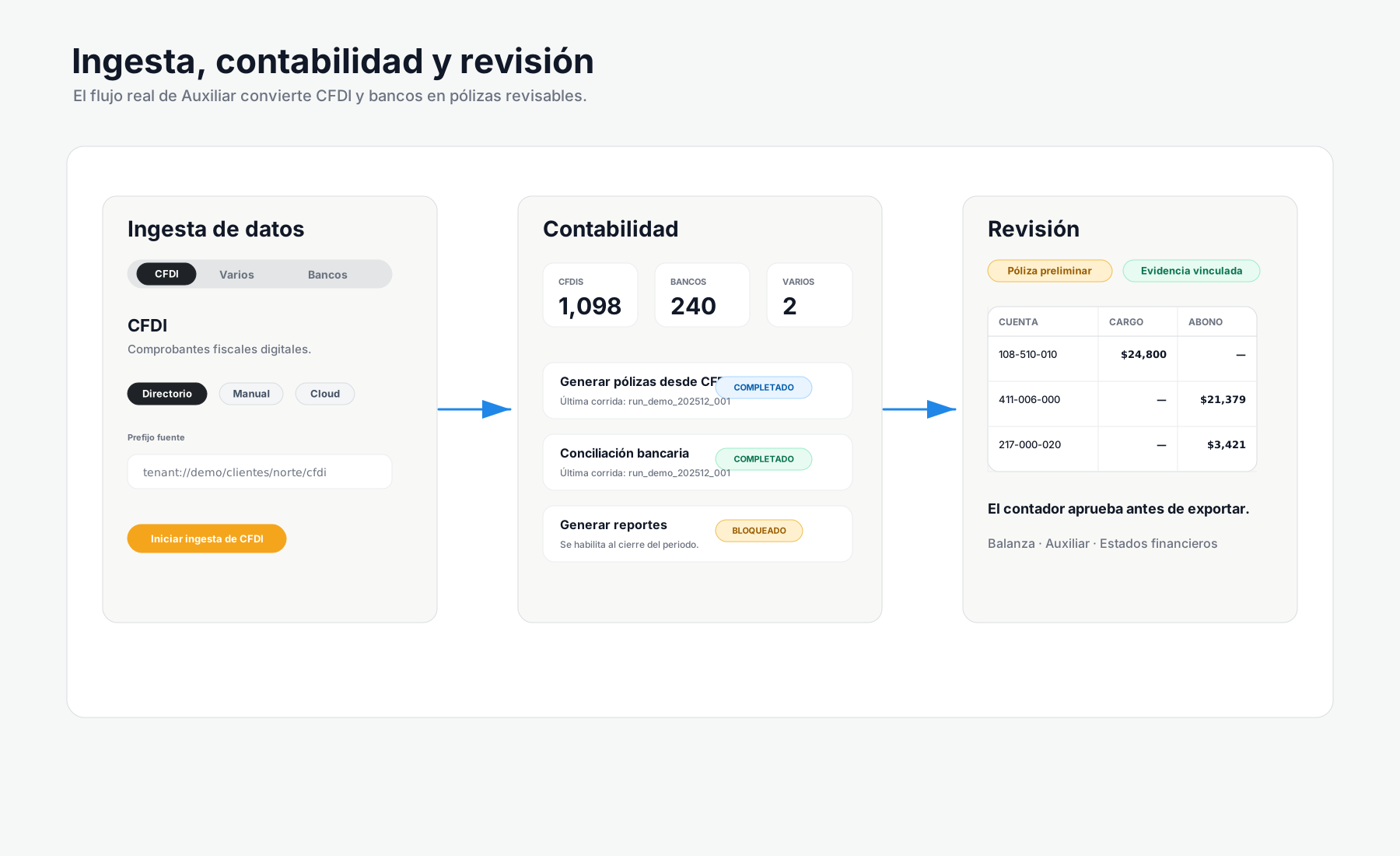
What Auxiliar is
Auxiliar is built to operate complex clients: CFDI, XML, bank statements, foreign invoices, supporting documents, depreciation, employer contributions, bank reconciliation, policies, trial balance, and review.
Onboarding
Onboarding depends on client size, historical data quality, and documentation complexity. Before proposing a workflow, we review volume, current systems, backups, controls, and supporting documents.
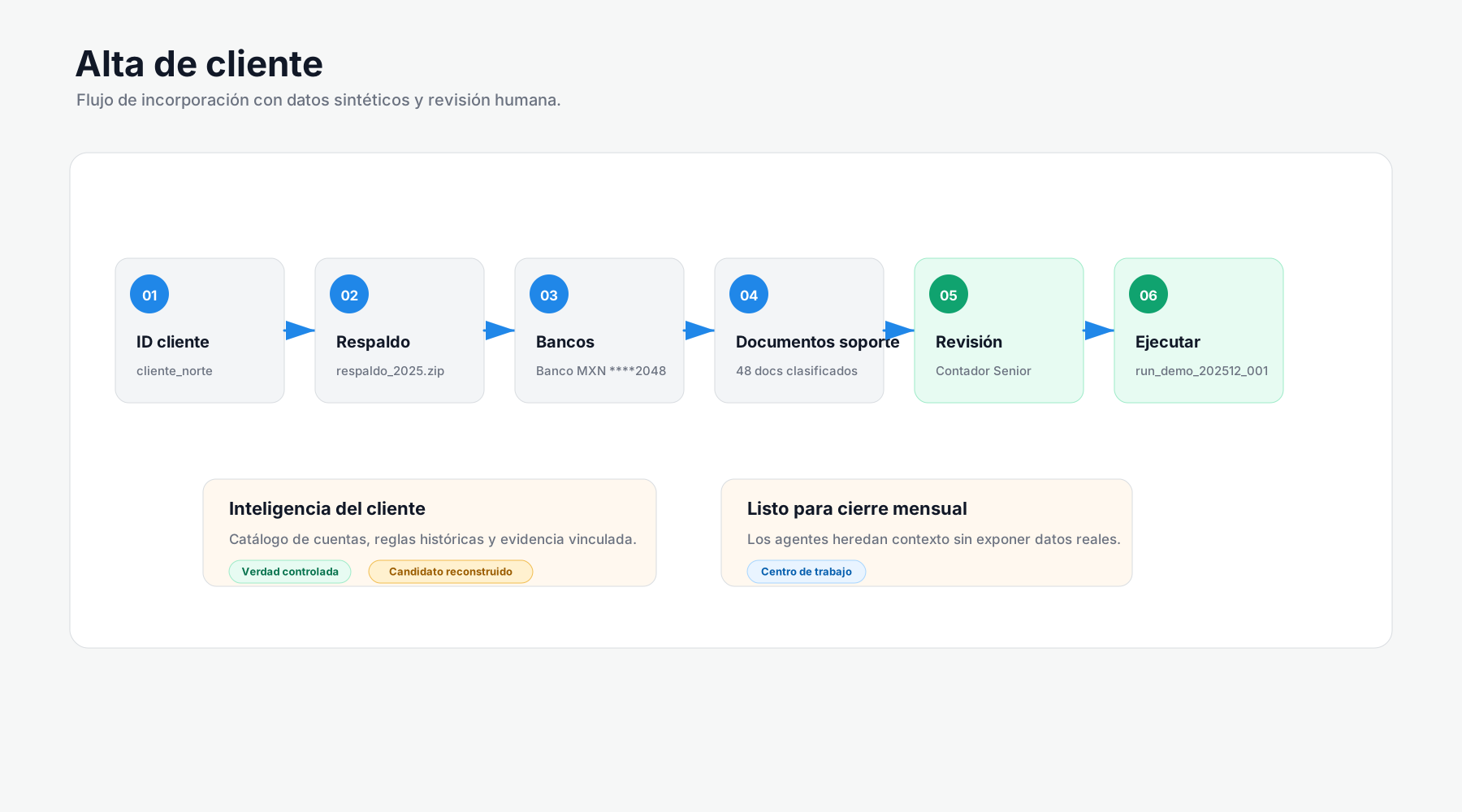
Incomplete historical data does not necessarily block the start, but it affects automation quality and expected hour reduction.
We review monthly CFDI volume, current workflow, backups, exports, chart of accounts, and close requirements.
Mapa de alcance
CFDI/XML, bank statements, ledgers, trial balances, supporting documents, foreign invoices, and relevant employer contribution support are incorporated.
Inventario de fuentes
Auxiliar identifies posting patterns, accounts used, recurring criteria, exceptions, and points that require review.
Base de criterios
The firm validates proposals, exceptions, and outputs before defining the operating rhythm for the next close.
Matriz de control
Client-specific intelligence
The process resembles assigning a junior accountant to study the history before taking the next period: how operations have been booked, which accounts are used, which support is missing, which criteria repeat, and where a reviewer must step in.
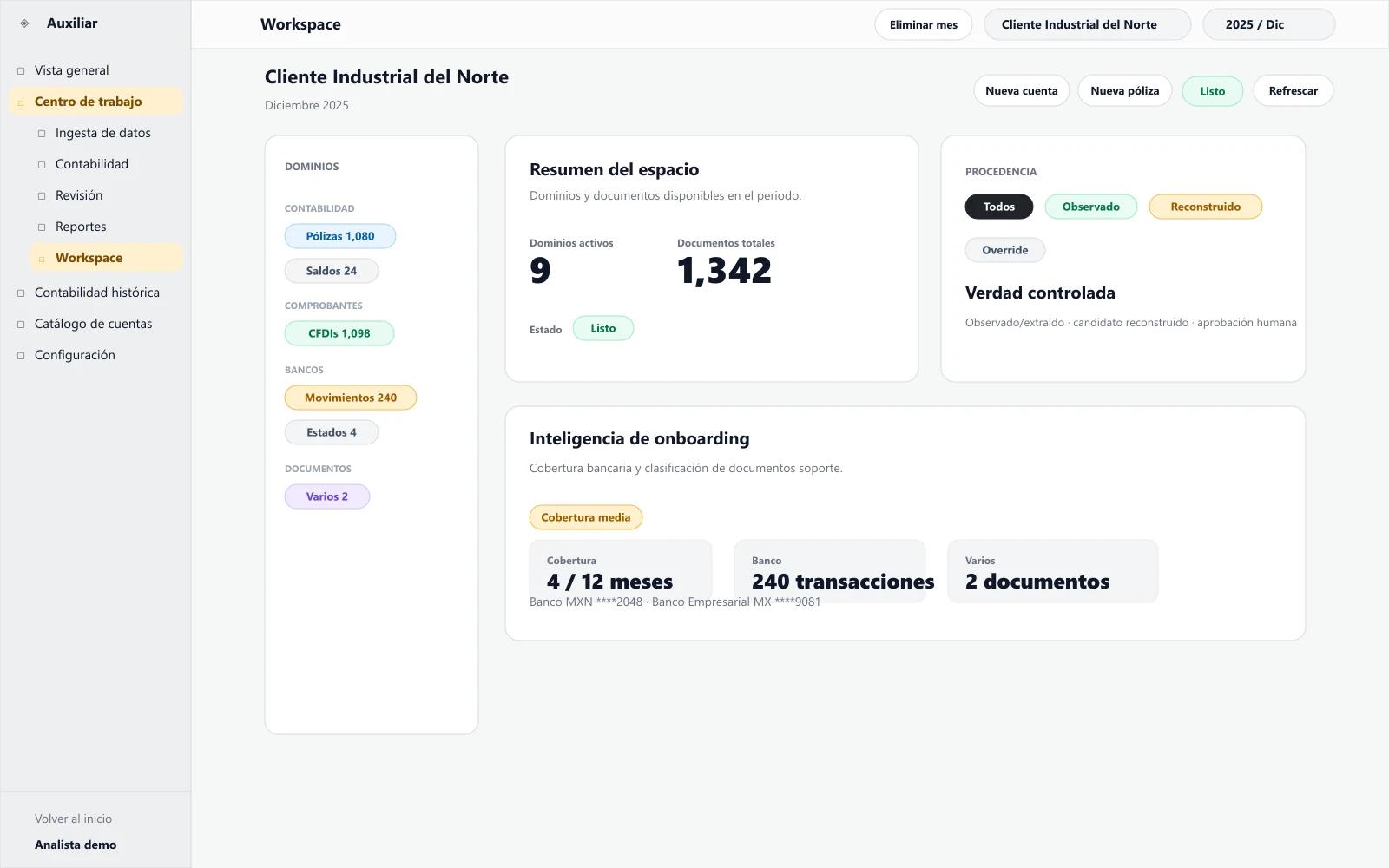
Client-specific context from historical data, XML, bank statements, and supporting documents.
Proposals aligned to the chart of accounts and observed criteria, subject to review.
Gradual improvement as Auxiliar processes more months with complete evidence.
Monthly close
Auxiliar works transaction by transaction. Each proposal should preserve its relationship to CFDI, XML, bank statement, or supporting document so the reviewer understands why it was generated and what is missing to close.
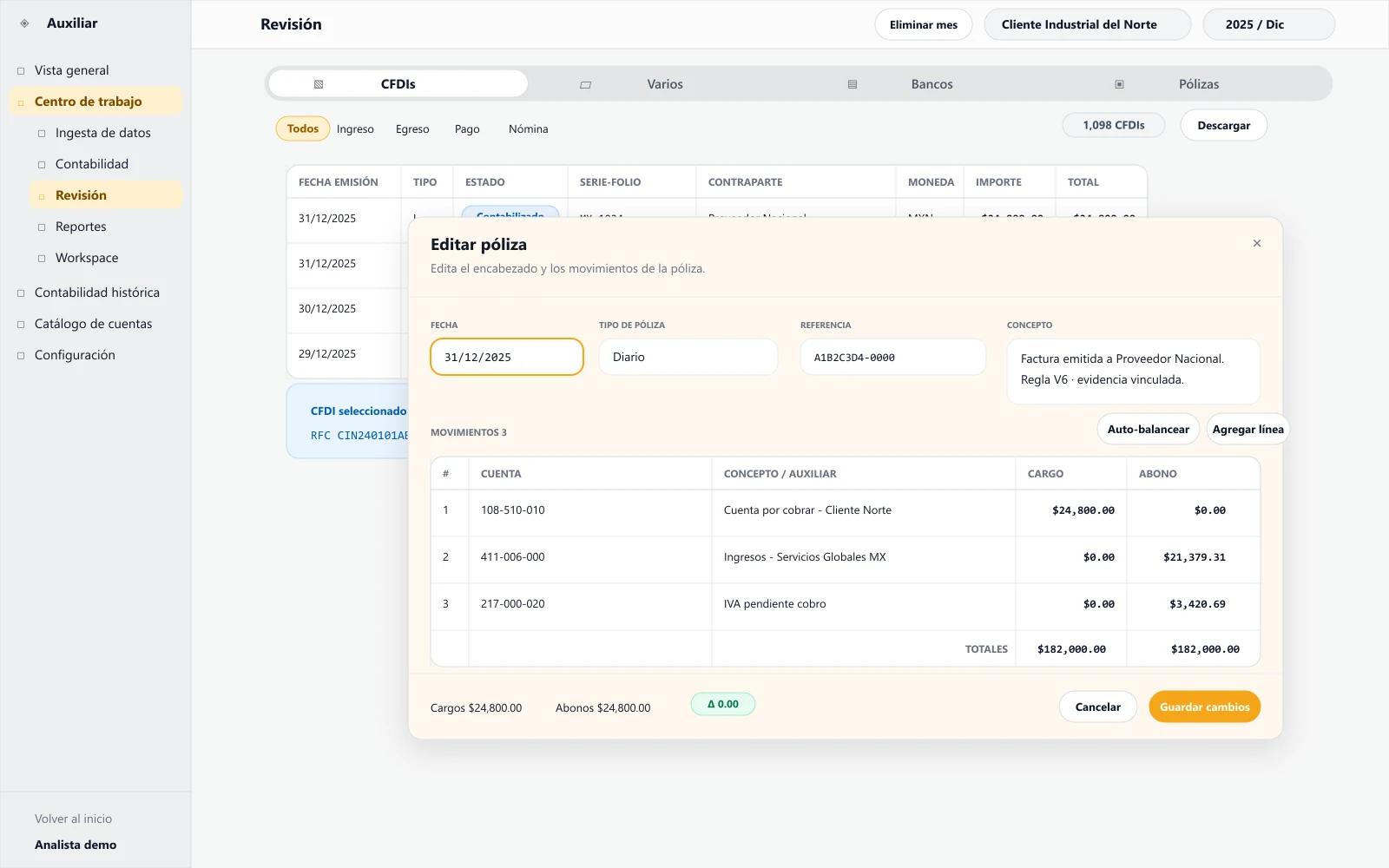
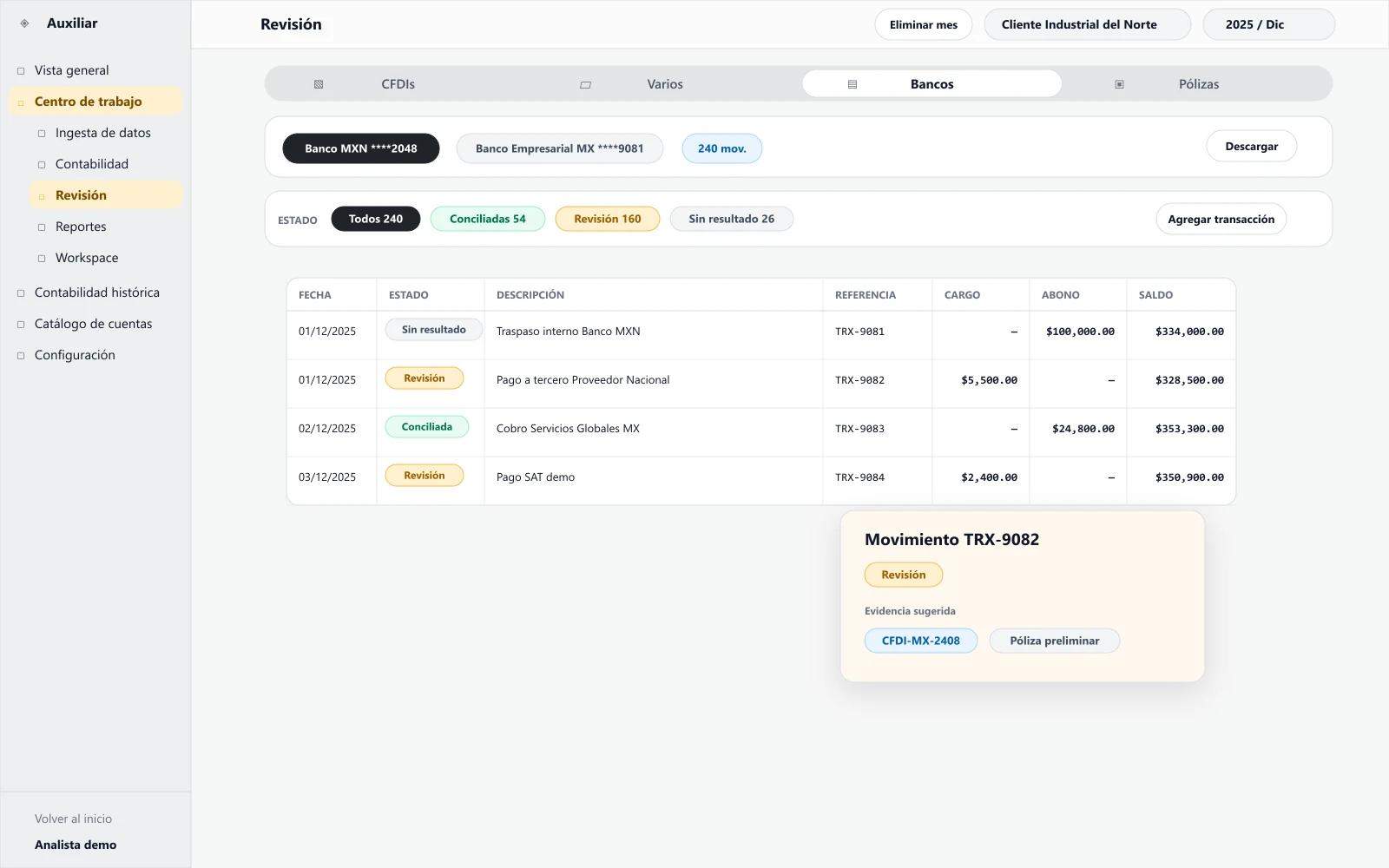
CFDI/XML, bank statements, foreign invoices, supporting documents, employer contributions, and available backups.
Analysis of chart of accounts, general ledger auxiliaries, trial balances, and recurring client criteria.
Accounting entry proposals linked to evidence and ready for firm review.
Relationship between bank movements, CFDI, supporting documents, and items that require clarification.
Missing documents, differences, unusual operations, and cases requiring accountant judgment are flagged.
The accountant keeps control over criteria, adjustments, and final approval before reports or exports.
Information can be prepared for reports, trial balances, ledgers, backups, or workflows with current systems after case review.
Human control
Auxiliar is designed so the firm defines what can be prepared, what is marked as an exception, and what needs approval. Professional responsibility remains with the accountant.
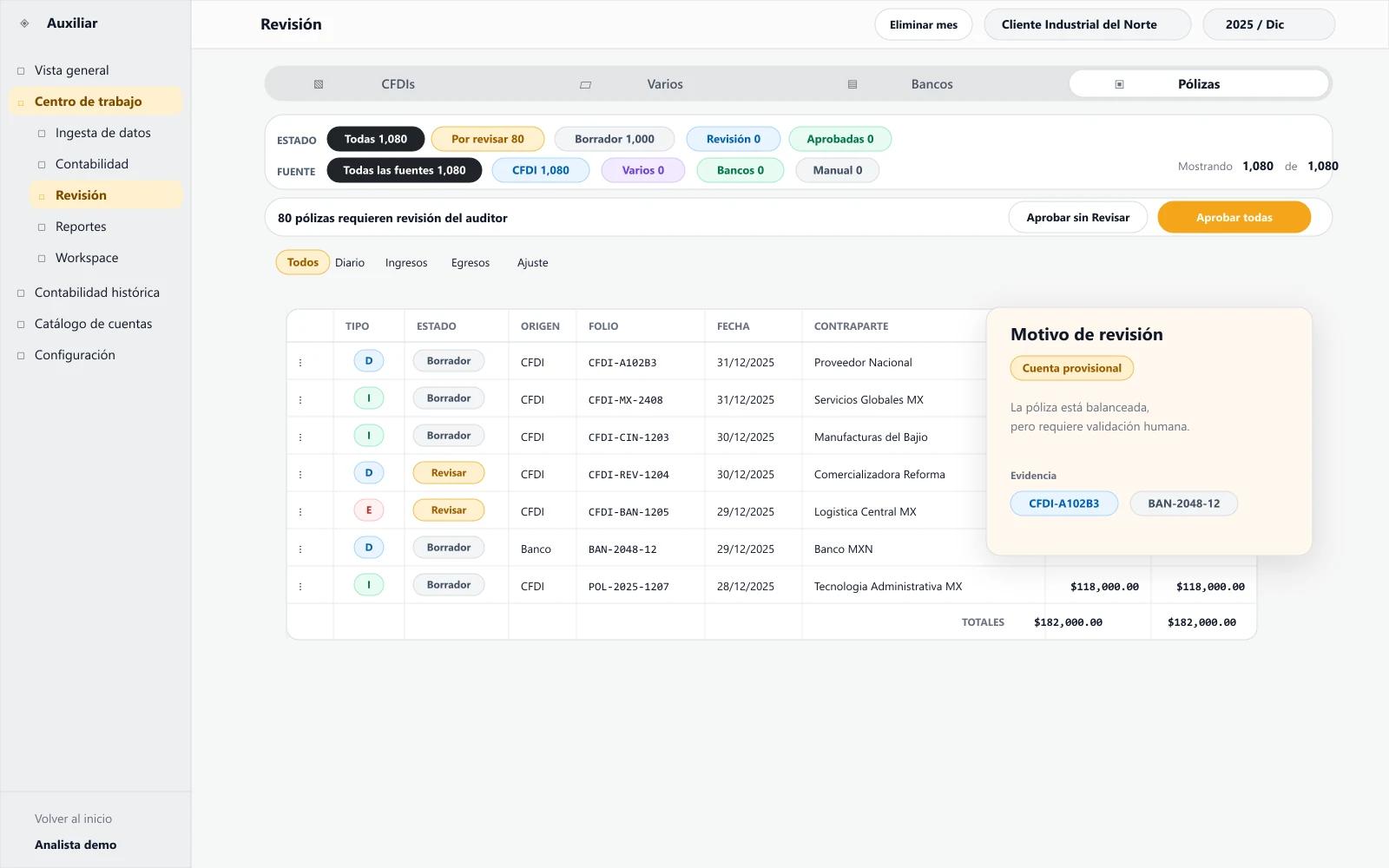
Review of preliminary policies before approval.
Logs and traceability between evidence, proposal, and applied criteria.
Exception queues for missing documents, bank differences, and unusual operations.
Separation of responsibilities between preparation, review, and close.
Casos preparados para criterio contable
Factura recurrente
Lista para aprobarPago sin CFDI asociado
Revisar soporteCuenta sugerida por historial
Validar criterioComplemento incompleto
Excepción abiertaCapacity and fit
Auxiliar fits best when documentation volume already requires industrial processes: large portfolios of enterprise clients, accounting teams saturated by entry and reconciliation, or companies with approximately 25,000 monthly CFDIs or more.
Current systems
We do not promise generic integrations without diagnosis. In some cases, Auxiliar works with backups, XML, bank statements, and exports; in others, it can become the main accounting workspace. The recommendation is defined after reviewing volume, systems, history, and required controls.
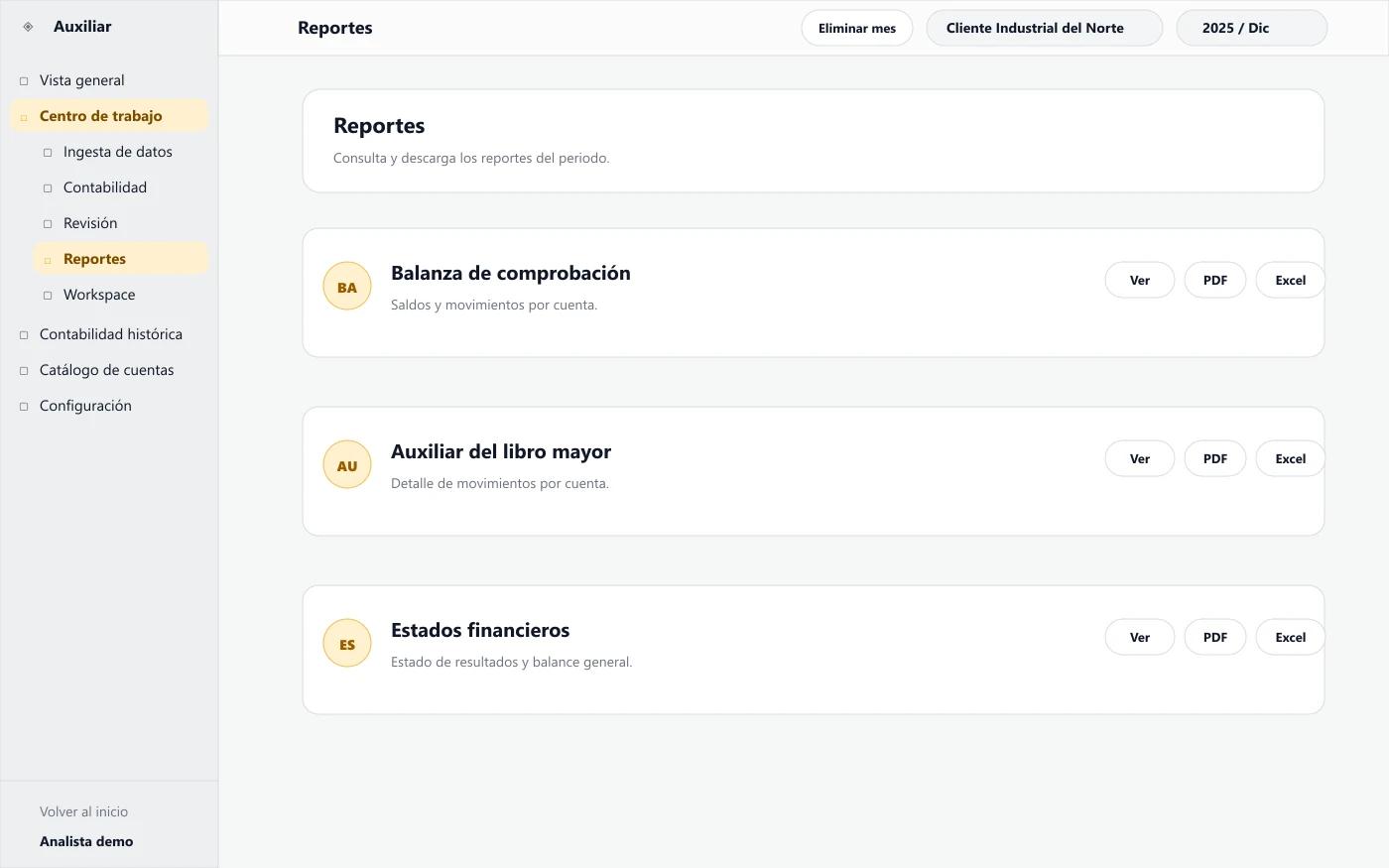
Compatibility is evaluated by workflow, not by public connector promises.
Imports, exports, and backups are reviewed before implementation.
Replacement decisions are made with the firm or accounting team, not as an automatic sale.
Security and privacy
Security and privacy are part of the design: access controls, client separation, logs, and data use policies. Before implementation, we review infrastructure, confidentiality, retention, and information governance requirements.
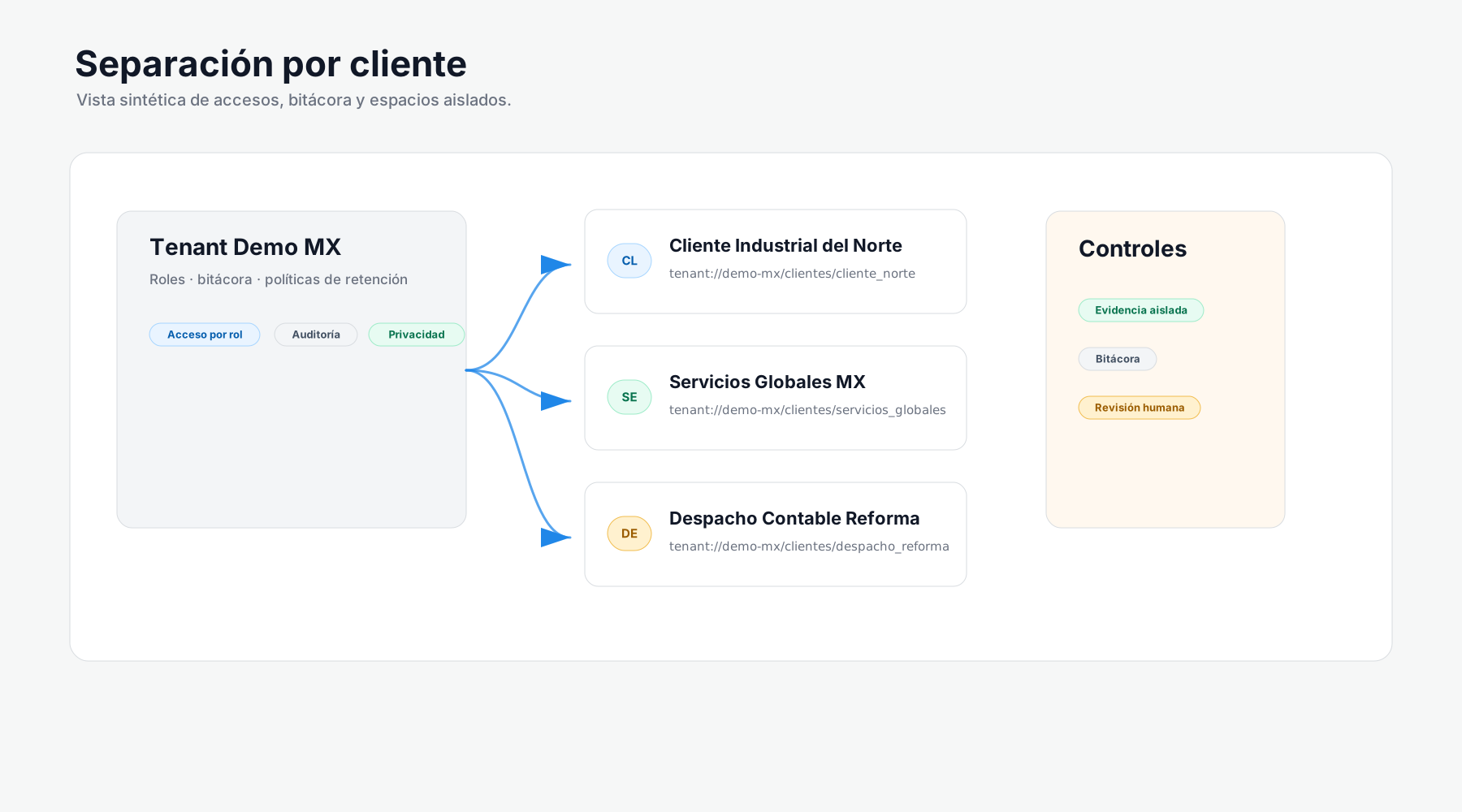
Access and permissions defined by role and operation.
Client-level data separation and care for accounting evidence.
Logs to support internal review and change traceability.
Infrastructure and retention requirements reviewed before each implementation.
FAQ
Short answers on scope, fit, onboarding, review, and security without promising universal results.
Auxiliar is a professional accounting workstation with AI agents. It helps high-volume firms and companies process CFDI, XML, bank statements, and supporting documents to prepare preliminary policies, reconciliations, exceptions, and reviews with client-level traceability.
No. Auxiliar is not designed as a receipt app or retail invoicing tool. It is built for professional accounting operations with high volume, client-specific history, transaction evidence, and human review.
For accounting firms and companies handling complex operations or approximately 25,000 monthly CFDIs or more. It is not a self-service product for individuals or small businesses with low document volume.
Because CFDI creates structured, machine-readable digital tax evidence. That foundation makes it possible to work with XML, folios, concepts, taxes, issuers, recipients, and stamps, plus bank statements and supporting documents. Even so, the close requires accounting judgment and professional review.
It normally takes 1 to 5 business days, depending on client size, historical data quality, CFDI volume, and supporting document complexity.
We review accounting system backups, CFDI/XML, bank statements, foreign invoices, support for foreign operations, employer contribution documents, ledgers, chart of accounts, trial balances, and any evidence relevant to monthly close.
During onboarding, Auxiliar analyzes history and deploys agents to build client-specific accounting intelligence: accounts used, policy patterns, recurring criteria, frequent support, exceptions, and points that require review.
It is not positioned as autonomous accounting without control. Auxiliar prepares reviewable work, flags exceptions, preserves traceability, and lets the firm define which steps require approval. The accountant keeps professional judgment.
It is designed to significantly reduce accounting hours in repetitive workflows. In implementations with complete historical data, it can generate initial reductions close to 50% and progress toward higher levels during the first months. Results depend on data quality, volume, documentation, and review process.
It can complement or replace parts of the workflow depending on the operation. In some cases it works with backups, XML, exports, and integration workflows; in others it can become the main workspace. The recommendation is defined after reviewing systems, volume, history, and controls.
Evaluation is based on the firm's real workflow: backups, exports, XML, bank statements, and integration requirements. We do not promise specific connectors without technical and operational validation.
Repetitive work will continue to automate. The opportunity is to move teams toward review, control, analysis, tax planning, advisory work, and client service while Auxiliar reduces data entry, classification, repetitive reconciliation, and support search.
Auxiliar is designed with access controls, client separation, logs, and data use policies. Specific infrastructure, confidentiality, and retention conditions are reviewed before implementation.
Because scope depends on volume, historical data quality, current systems, supporting documents, required controls, and deployment approach. The right next step is to schedule a demo and review onboarding.
Auxiliar can start with available data in some cases, but automation quality and hour reduction depend on the quality of history and supporting documents. That is why the initial diagnosis is part of the process.
Auxiliar helps structure accounting operations and the evidence that supports tax work. Specific obligations, returns, and filings must be defined with the firm and its review workflow.
We analyze CFDI volume, current systems, historical data quality, supporting documents, and review controls before proposing the workflow.